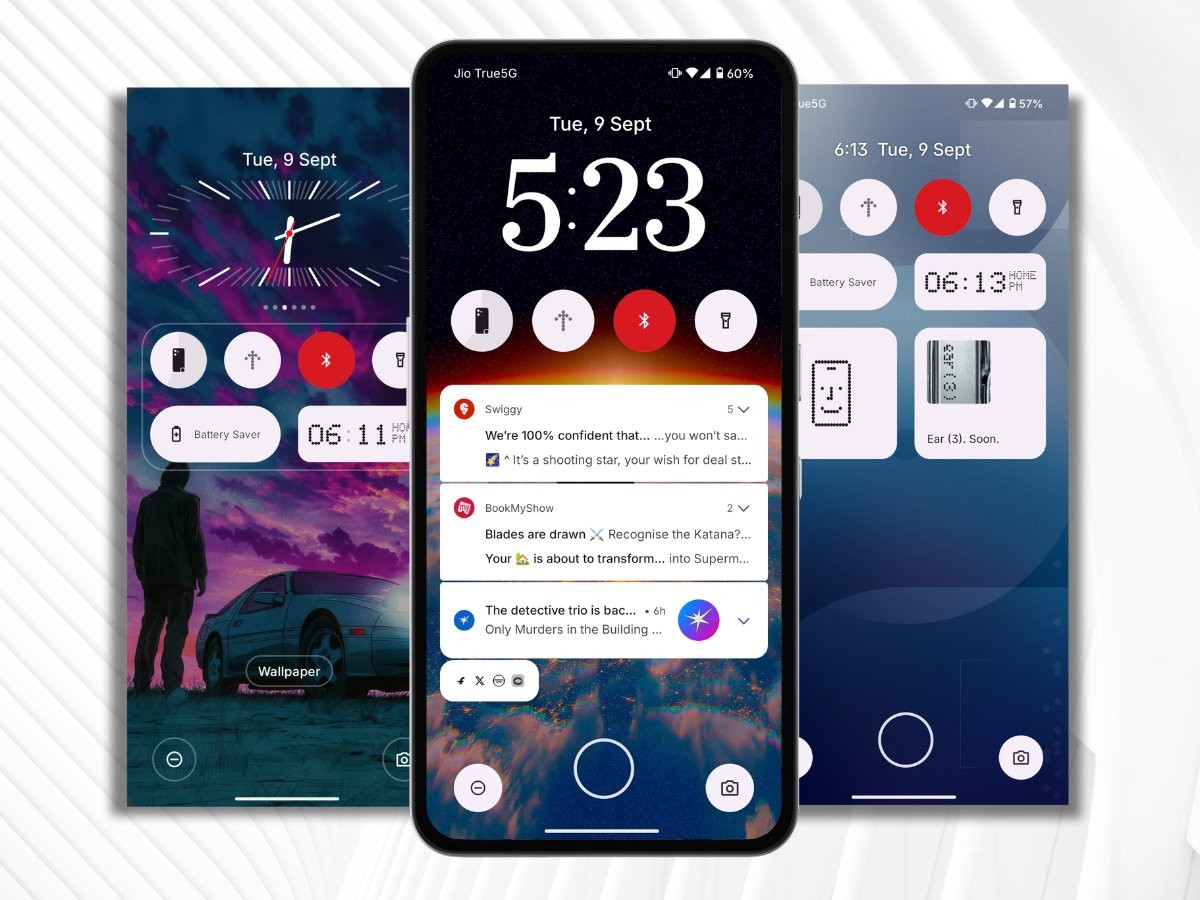
Nothing OS is known for simplicity, while injecting its own flavour into stock Android. It follows mostly the same style for the lockscreen as stock Android and that makes it very functional.
Read on 👇🏻:
✅ The notifications received on lockscreen stay as it is until you dismiss them manually. ColorOS & HyperOS make the notifications disappear after phone unlocks
✅ The Media player looks good with the album art covering the entire widget. It also has a seekbar!
✅ You can press and hold on an empty space on lockscreen to go to the customisation menu
✅ The ‘Do Not Disturb’ mode works flawlessly on lockscreen in which the app notifications don’t come through. This doesn’t hold true for several custom skins.
✅ There’s support for static and interactive widgets. You can even expand the area to fit in more or larger-sized widgets
✅ The transition effect from AOD to lockscreen is super smooth and looks cool
However, it also has its fair share of cons:
❌ The lockscreen only supports first-party widgets. This is probably done to offer a more cohesive look because third-party widgets follow their own design.
❌ The clock styles are limited for now and don’t offer the option to change colour or add a depth effect.
❌ Can’t set the bottom two lockscreen shortcuts to open apps. Only quick-setting shortcuts are available.
👉🏻 If you’re expecting big-sized clocks that cover half the lockscreen, blur and depth effects or a variety of transitions Nothing OS fails at that.
But what it does better is offer a functional experience. It delivers things that actually matter on a lockscreen. In a nutshell, NOS lockscreen is function over form.


