To be specific, the problem stems from my everyday life and the solution is aligned to solve my problem though it can help out more people who struggle with the same problem.
My home has 3 vehicles and none of them have smart insights to how much fuel they consume. Most vehicles do not come equipped with tools that calculate how much fuel your vehicle burnt through since you last got them filled.
I am always skeptical of how much my vehicle runs every time I get fuel or if the performance is degrading and it needs to visit the mechanic. Seeing this problem, I utilised Essential Lab Challenge to build a Vehicle Health Tracker that knows how much you expect your vehicle’s mileage to be.
Setup Page: You enter expected mileage and a minimum acceptable mileage threshold below which you will get a warning that your vehicle requires maintenance.
Settings Page: Update values of Setup Page and Reset all data.
Fuel Page: You enter where your odometer is currently at and how much fuel you got and the date of fill (default to today)
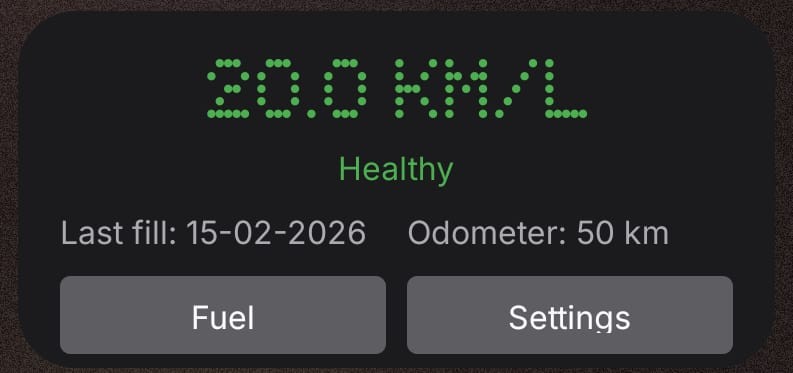
Home Page: Displays color-coded average, date of last fill, odometer value at last fill and color-coded messages - 🟢 healthy, 🟠 degrading, 🔴Requires Maintenance, navigation to Fuel and Settings pages.
Some notable UX features:
- validation on input fields to avoid filling negative numbers or text values.
- default date set to today
- Color Coded values for visual feedback
Experience using Essential Lab Playground:
It works really well. If you are clear in defining the problem, intended solution, a clear idea of what you want, its features and pages then Essential App Builder does a phenomenal job at creating a good first draft which can be refined further.
Problems I experienced:
- In one of the versions, the Save button on setup page of my app was unresponsive even though the inputs were working. I suspect either it was a server issue, or it was a memory issue on client side. Refreshing the tab made it work.
- Sometimes it got stuck and did not do any changes at all and required a tab refresh.
- Hallucination: It got the color coding and warning logic wrong. Got it to update that but it also changed the mileage calculation formula which I did not catch up on until my app was submitted.
Suggestion:
Option to create and run tests before publishing to catch missed or newly introduced logical errors.
Summary:
I have three vehicles at home and none of them tell me how much fuel they’re actually burning between fills, so I built Vehicle Health Tracker during the Essential Lab Challenge. You set your expected mileage and a minimum threshold, then log odometer and fuel each fill. The home screen shows color-coded status (🟢 healthy, 🟠 degrading, 🔴 maintenance needed) with date defaults and input validation. The builder worked well when I was clear about what I wanted, but I ran into issues like the save button randomly goes unresponsive, app freezing, and the AI hallucinating color logic which led to a silent bug in mileage calculation that I didn’t catch until after submission. My suggestion: add a way to run tests before publishing to catch logical errors early.