Overall, the hotspot is unbelievably terrible in this June 2026 update, at least for the Phone (3a). This isn’t an isolated case either, as I have two of them to test (the other being my gf’s), and they both perform exactly the same hotspot-wise. There was absolutely not a single issue before this B4.1-260618-1048 update. Now… absolutely everything is an issue, lol 🤔
For example, 5 GHz is borderline impossible to use. Even when explicitly selected, it will default to 2.4 GHz on its own (5 GHz remains selected in the settings, but any connected device is forced onto 2.4 GHz). If, by some magic, it manages to actually “stick” to 5 GHz, it almost always uses network channel 40, and very rarely channel 36. When it’s on channel 40, the hotspot will automatically turn itself off randomly, after a few seconds or a few minutes, but it is 100% guaranteed to shut off for no reason (and yes, “turn off hotspot automatically” is toggled off).
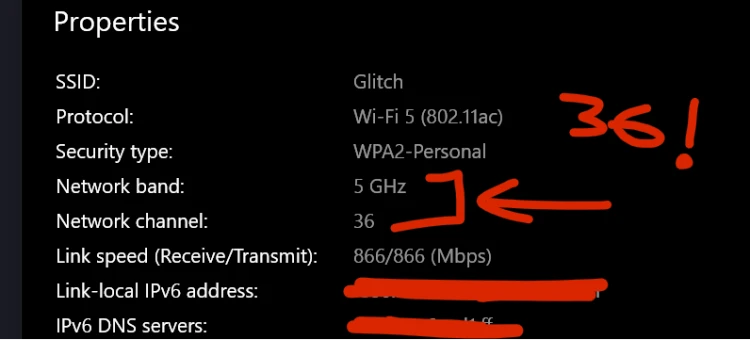
When it hits channel 36, it’s rock solid and never turns itself off. There isn’t a single problem with that channel, except that you need to toggle the hotspot on and off approximately 50 to 100 times consecutively to finally “hit” it, and that is without a single bit of exaggeration. Why? Because of the aforementioned issue where 5 GHz is selected but the phone still drops to 2.4 GHz in 95% to 98% of cases.
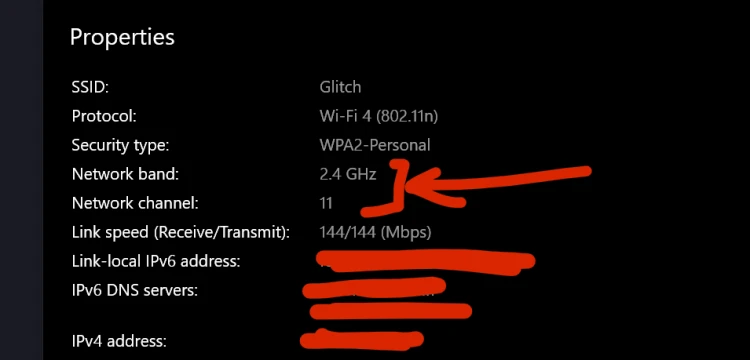
Now, the issue with 2.4 GHz is that it is much slower (capped at 144 Mbps, whereas I have unlimited 5G data and was perfectly fine using 5 GHz at 866+ Mbps prior to this update). It is also literally impossible to get lucky enough to hit the only nonproblematic network channel - channel 1. When 2.4 GHz is active (either because it was forced by the bug or explicitly chosen), it uses channel 11 about 90% of the time, channel 6 about 9% of the time, and channel 4 for the remaining 1%. In the 22 days since the update, I have gone from being able to ALWAYS use channel 1 on 2.4 GHz to literally not hitting it a single time yet.
Why is that a problem? Because of major 2.4 GHz interference with my peripherals. My mouse and keyboard freeze every few moments (they are not defective, they work perfectly fine when the hotspot is off and/or if that hotspot is not 2.4 GHz network channel 1 or 5 GHz any channel), and even my other laptop glitches like crazy. When that laptop’s display is set to 165 Hz, the image will actually constantly “vibrate” because the antenna is in the display lid, though it doesn’t do this at 60 Hz. I never had a single one of these issues on 2.4 GHz with channel 1. That channel is perfect, but I have yet to hit it again in B4.1-260618-1048 🙃 (instead of basically pretty much ALWAYS, for 2.4 GHz, before that specific update)
It’s the exact same story as 5 GHz with channel 36 (the perfect one with zero issues). So now, instead of just selecting 5 GHz and being able to use it, I have to play a toggle lottery for 10 to 15 minutes daily just to get lucky and hit channel 36. Channel 40 would be great too, if the hotspot didn’t constantly shut itself down on it when it’s on 40.
This happens in both SIM slots on both Phone (3a) devices, with any security setting in the hotpot settings, immediately after reboot, or after many hours… starting the exact day they were updated exactly 22 days ago. The phones aren’t overheating (or running hot at all, not even warm, normal room temperature). The issue is identical whether the phone is charging or not, except for one thing - when the phone is plugged into a charger, it is completely impossible to ever trigger 5 GHz. You have to leave it unplugged, flip the hotspot toggle dozens of times, and only once you finally get lucky and hit a 5 GHz connection on channel 36 can you plug the charger back in. It is a hell of an everyday hassle…
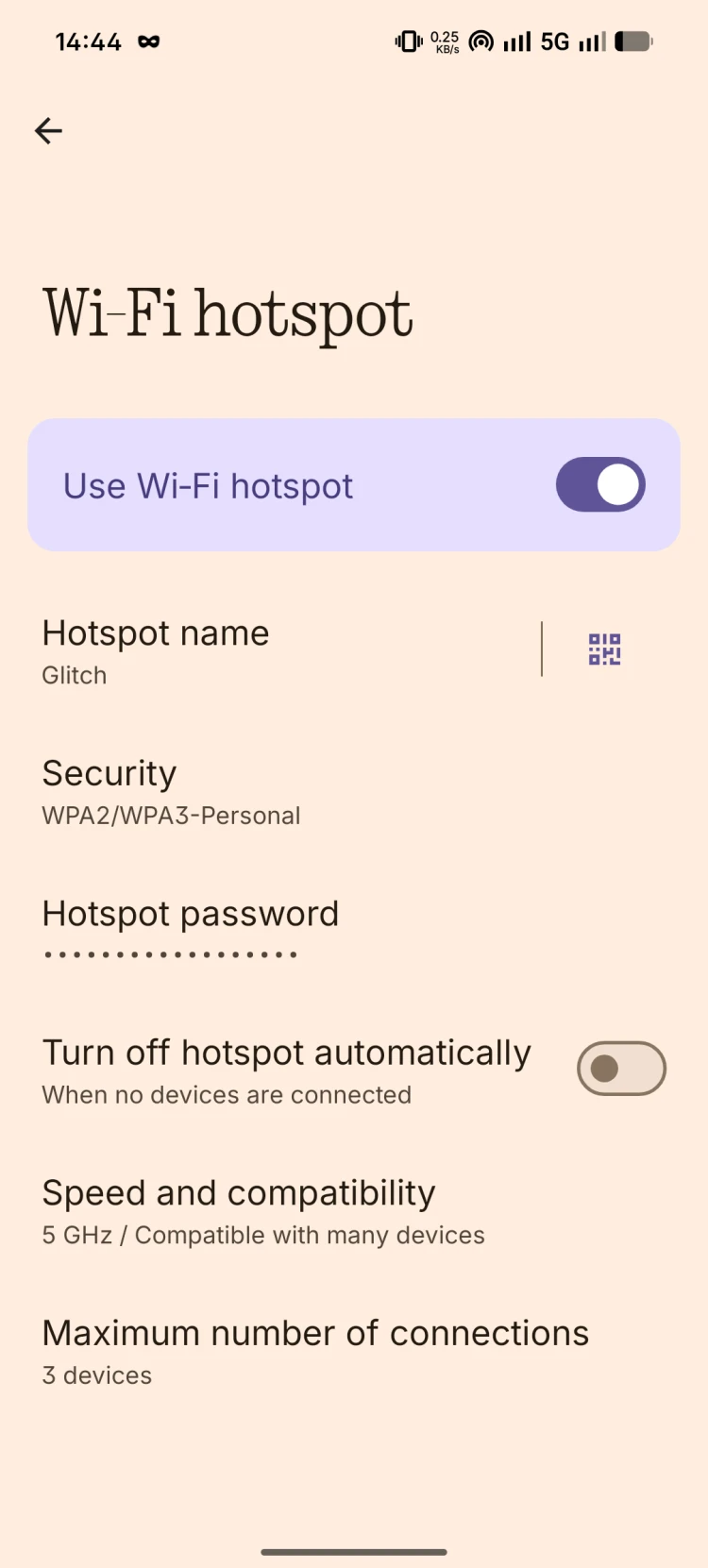
Now it’s 5 GHz explicitly selected:
But it’s still 2.4 GHz NC 11 as pretty much always when it goes to 2.4 GHz (and, amusingly enough, it’s the most problematic channel as it causes the highest amount of 2.4 GHz interference with my other devices):
Now the real “fun” starts… Attempting to toggle it off and back on until I hit 5 GHz NC 36, and for who knows how much… A minute? 5 minutes? 10 minutes? It’s a mystery…
Edit: 16 minutes. It took me 16 minutes of toggling off/on to finally hit 5 GHz (and even NC 36!! It’s time to buy that lottery ticket today 🤩):
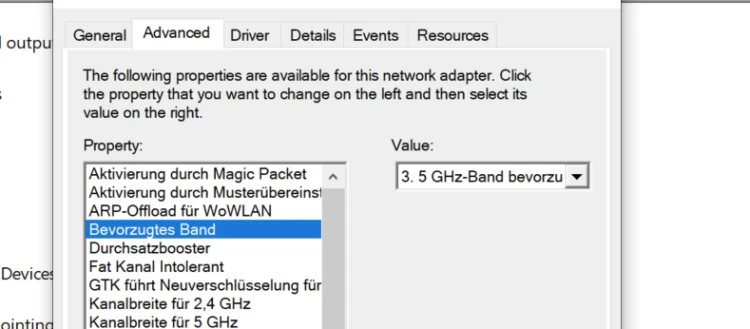
This laptop is selected to always choose 5 GHz, btw (and connect to 2.4 GHz if no 5 GHz is available):
But not even the other (3a) is able to connect to that hotspot when it’s 5 GHz-but-not-5 GHz-and-2.4 GHz-instead. and it also recognises it as a 2.4 GHz one (now it shows it as a 5 GHz, because it’s finally 5 GHz active and running). Pop the SIM in my random backup Redmi phone and choose 5 GHz in its hotspot settings? Every device (including my laptop(s)) will ALWAYS connect to a 5 GHz on that hotspot - because it’s 5 GHz, not fake 5 GHz like with this recent June 2026 NOS 4.1 update. Fake = 5 GHz selected in the hotpot settings but the phone still ignores that and runs it at 2.4 GHz.


