As a TLDR, the Nothing Phone (4a) is an upgrade in practically every respect compared to the previous mid-ranger lineup. Most of the upgrades are welcome, some less so, but overall it’s a very strong phone. That said, I find it tough to review the incremental upgrades over the 3a because they don’t feel significant, so while it is a genuinely good phone, my focus is directed towards where the 4a differs more majorly from the previous lineup. And that’s where I tend to make my opinions clear.
Without further ado, I’ll introduce the phone. The Nothing Phone (4a) comes in together with a bigger brother, the 4a Pro. And they couldn’t really look more different. This isn’t the first time Nothing have made different design choices between the xa and the xa Pro; the 2a Pro came in exclusive colours and didn’t have the iconic Nothing white colour or the variety of new colours the regular 2a had. But otherwise the design was largely similar. Then came 3a and 3a Pro, where the pair had a noticeably different design to each other. Personally, I attributed this to a need to accommodate larger camera modules on the 3a Pro; the bigger cameras just wouldn’t work on the base design as is, so they tweaked the design and made a bigger thing of the better cameras, resulting in the traditional camera bump looking like the top of a can. But now, with the 4a and 4a Pro pair, I’m not so sure. The stark difference in design this generation isn’t just down to accommodating a bigger camera bump, they’re practically entirely unrelated devices.
While Nothing are venturing out with the design of the 4a Pro, boldly ditching the ‘transparent’ back and the glyphs which Nothing have built their image around, the 4a feels more iterative. And that’s exactly what this phone is in my mind — iteration. Safe iteration, together with the 4a Pro which is making a bold play for a bigger market share. And now those previous generations make a bit more sense — to me, Nothing are trying to keep their current target audience while also trying to reach more people through diverging design choices. Which probably makes sense as a business strategy. Be bold and see what works. But keep your existing customers happy without alienating them from the brand.
Design
My preference
I prefer the regular 4a design. I love the texture and depth of the phone. The 4a Pro ditches this design choice, opting instead for an almost plain design, putting emphasis on the standout ‘camera bump’ module and borrowing the matrix from the Nothing Phone (3). People make comparisons every generation that Nothing phones look like iPhones with skins, and this might be the first time where I actually agree with that statement. It kind of looks like an iPhone with some sort of retro device glued to the back. So I’m very much in the ‘existing’ target audience preferring the regular 4a. Which is good, because this is a regular 4a review!
As an aside, one thing I am looking forward to this year is the Community Edition. For the past couple of years, Nothing have let the community design special editions of their phones, and to be honest I’d love to see the community bring some of the traditional Nothing design concepts back to the Pro version (if the Pro version will be used as the CE model that is).
The Feel
Every generation I hope, and every generation I notice it goes in the opposite direction I would like. Therefore, the very first thing I think about with a new Nothing Phone is — how big is it?
This time it was no different, I wondered how it compares to the older generation devices. And again, it was no different; this one is marginally bigger than before. In fact, it’s the biggest phone yet, with the phone’s dimensions trumping even the 4a Pro which has the biggest screen to date. Technically the 3a Lite has larger H and W dimensions, but, because the 3a Lite is slightly thinner, the 4a still comes out as the ‘biggest’ device yet overall.
| Model | Screen | H × W × D (mm) | Weight | Volume | Year |
|---|
| Phone (1) | 6.55″ | 159.2 × 75.8 × 8.3 | 193.5g | 100.2 | 2022 |
| Phone (2) | 6.7″ | 162.1 × 76.4 × 8.6 | 203g | 106.5 | 2023 |
| Phone (2a) | 6.7″ | 161.7 × 76.3 × 8.55 | 190g | 105.5 | 2024 |
| Phone (3) | 6.67″ | 160.6 × 75.6 × 9.0 | 218g | 109.2 | 2025 |
| Phone (3a) | 6.77″ | 163.5 × 77.5 × 8.35 | 201g | 105.8 | 2025 |
| Phone (3a) Lite | 6.77″ | 164.1 × 78.1 × 8.35 | 199.2g | 106.9 | 2025 |
| Phone (4a) | 6.78″ | 163.9 × 77.5 × 8.5 | 205g | 107.9 | 2026 |
| Phone (4a) Pro | 6.83″ | 163.7 × 76.6 × 7.95 | 210g | 99.7 | 2026 |
Obligatory phone size rant below
At some point this trend has to stop, right? Or else eventually we’ll just all end up with tablets. I am undoubtedly an advocate for smaller and more ergonomic phones and I mention it whenever I’m asked about my opinion on a device. But there is a reason for that. They’re just more comfortable, more user friendly and are easier to use with one hand. And I have medium-large hands yet I’m still saying that, so surely there’s a huge audience out there who just can’t use larger phones. I know plenty of people who point blank refuse to get new phones because they’re all too big, instead opting for refurb units of models six years old for lack of a better choice. Granted, a larger and larger audience is consuming media on their phones these days, from social media to streaming services, and a bigger screen is better for that. But not everyone is doing that, and trying to make a phone more capable of dishing out content on a bigger screen is detracting the user experience in every other aspect, so it’s just a lose-lose if you don’t watch movies and reels on your phone now. I would prefer to see some innovation over that; I remember phones in the era of mobile innovation where we saw phones with screens that mechanically slid out to reveal a physical keyboard, but stayed compact when you just needed a phone with a couple of physical buttons or an early generation touch screen keyboard. We’re seeing a revival of that line of thinking again in TV screens, laptops and phone concepts where a bigger screen can be rolled out on demand. Concept phones with rollable screen tech have emerged every year for the past few years, including one from Samsung which was revealed mere weeks ago, but it seems we’re still a long way off that tech becoming sufficiently reliable, durable and cheap that we can enjoy it day-to-day in our mobile phones too considering none of the concepts have yet made it to commercialisation.
Back to the main points
Phone size aside, there is more to a phone than just the dimensions. We’ve also got the button placement, the haptics, the material and the balance of the device all contributing. Obviously this is a ‘midrange’ phone, so instead of aluminium there’s plastic, and instead of premium components we’ve got weaker parts so the haptic motor feels a bit hollow compared to more premium offerings. These are the kinds of things you notice when you pick up a phone and you get the impression of whether it feels like what you paid for. The haptic motor here is an X-axis linear motor, which is better than the cheap buzzy motors using z-motors you get on true budget phones (including some of the CMF phones), and Nothing have done a solid job integrating haptic feedback throughout the OS, where you frequently get a satisfying subtle tap rather than a crude vibration. But it’s just ‘good for class’ tier, not premium tier. There have been moments when typing I wonder if the haptics engine changed because the haptic feedback suddenly felt uncomfortable before I got used to the haptics again.
The back is covered with glass, which does enhance the feel significantly and puts the 4a at a more premium-feeling level. This is just Panda Glass 1681 though, not the Gorilla Glass 7i that covers the front, so the back is likely to be more prone to scratches. But if you’re concerned about that, you can always use the case bundled into the box alongside the phone. Personally I’m using the phone caseless, both because of added bulk the case gives on top of the huge footprint of the phone, and to enjoy the more premium in hand feel more despite the slipperiness of the glass. The glass back also supposedly helps with thermal management since glass conducts heat better than plastic, so heat from the Snapdragon chip can dissipate through the back panel better rather than getting trapped inside if you’re running it to its max. You can also really tell the difference between plastic and aluminium on the frame though. This is a midrange phone though, so plastic is to be expected and the glass back is already a nice touch.
One drawback about this phone though that can’t be excused as a cut for budget reasons — the button placement. I hate it. The power button is good. The essential key is a bit out of reach, but that’s fine as I don’t use it frequently and having it up a bit helps prevent accidental button pressing. But the volume keys are all kinds of wrong. They’re directly above the power button, and feel exactly the same. At least the essential key has a more rounded feel to it so you might know which one you’re touching, but the power and volume keys are close and identical. Having the volume keys on the same side as the power button also stops you from easily taking screenshots with a thumb/forefinger pinch on either side of the phone, and the number of times I’ve gone to use the volume key to take a photo but have accidentally clicked the essential key is unreal. I would prefer the Essential Key to be above the power key, far above where the volume up button currently is. I hope this layout is not here to stay and that future phones have the layout reverted.
Performance
The 4a runs on the Qualcomm Snapdragon 7s Gen 4, a 4nm chip that’s an incremental step up from the 7s Gen 3 in the 3a. Nothing claim 10% better power efficiency over the previous generation. Can I tell the difference? No. I can tell the difference between this and the regular 2a, and I can feel the difference between this and more premium devices, but over the 3a it comes back to what I said at the start — iteration. For everyday use (messaging, browsing, taking notes, maps) this is more than adequate. For gaming it is also perfectly adequate, even if you’re not getting 120 frames constantly. Nothing OS also deserves a shoutout here, because the phone feels far smoother than the raw benchmark numbers might suggest.
One aspect where the updated specs do matter and where I can tell the difference is storage. The jump from UFS 2.2 on the 3a to UFS 3.1 here is significant — and in my experience, this is one of the most tangible day-to-day improvements on this phone. Nothing’s own numbers say 147% faster reads and 380% faster writes, and while I haven’t independently verified those numbers, it does feel noticeably faster. You feel this when installing apps, loading large files, or switching between apps with lots of cached data. And multitasking is surprisingly capable — I haven’t had many instances where tabs I’ve temporarily switched out of have closed unexpectedly in the background, which is very refreshing.
The RAM here is LPDDR4X rather than the LPDDR5 or LPDDR5X you’ll find on some competitors at this price point. While it’s a generation behind on paper, this is another area where I can’t feel the difference in daily use. It also has a RAM Booster feature, but again I felt no difference with this turned on or off and I’m dubious about whether using regular storage as virtual RAM would even mean anything. In any case, I’ve got the 12 GB RAM version and it’s more than sufficient.
Battery
The 5,080 mAh cell is the largest Nothing have put in an a-series phone, and it shows. I am quite happy with the battery life; I’m one of those people who only charge up to 80%, and I’m usually ending the day on 20–30%. For context, that includes plenty of reading, browsing, bluetooth is constantly in use, frequent music streaming, calculator and note taking…
When I do need to charge it, charging is sufficiently fast. It’s no game changer, but 50W is certainly enough. Nothing’s own figures say 1% to 50% in 22 minutes and 1% to 100% in 64 minutes. That’s obviously in perfect lab conditions, but it’s not far off. I don’t usually look at my phone while charging, but it’ll be finished charging after about 45 minutes or so (20–80%). There’s no wireless charging, which I am absolutely fine with. I still do not understand the use case for wireless charging or why so many phones include it. The only time I’ve ever used it was as reverse charging for earbuds, but equally I can just connect the two via the USB C to USB C cables that have become mainstream. Or plug them into a powerbank.
Camera
The camera system is a great upgrade for the 4a considering the new addition of a periscope telephoto. The periscope uses the same ½.75″ Samsung JN5 sensor as the Phone (3), but the new tetraprism construction lets it fit into a smaller area and offers a greater zoom; the 4a has 3.5x optical zoom versus the Phone (3)'s 3x. That’s fairly impressive in a phone under £350, although to be honest I would expect better from the Phone (3).
The processing pipeline is where this phone falls a bit short though. I have seen some amazing shots from the 4a, but not as a point-and-shoot camera. The two most noticeable areas to me are that colours are a bit dull, and photos lack detail. The colour can be fixed in post, but I do feel like the Nothing Phone (2), which was the second phone of their now nine (?) strong lineup, does take better photos overall despite the 4a benefitting from an additional two years of experience and optimisation. Interestingly, some professional reviewers have found the opposite problem — over-saturated colours and over-sharpening — so it may be that the processing just isn’t consistent rather than uniformly one way or the other. Still, it’s a very decent camera for a mid-range phone, if not the best.
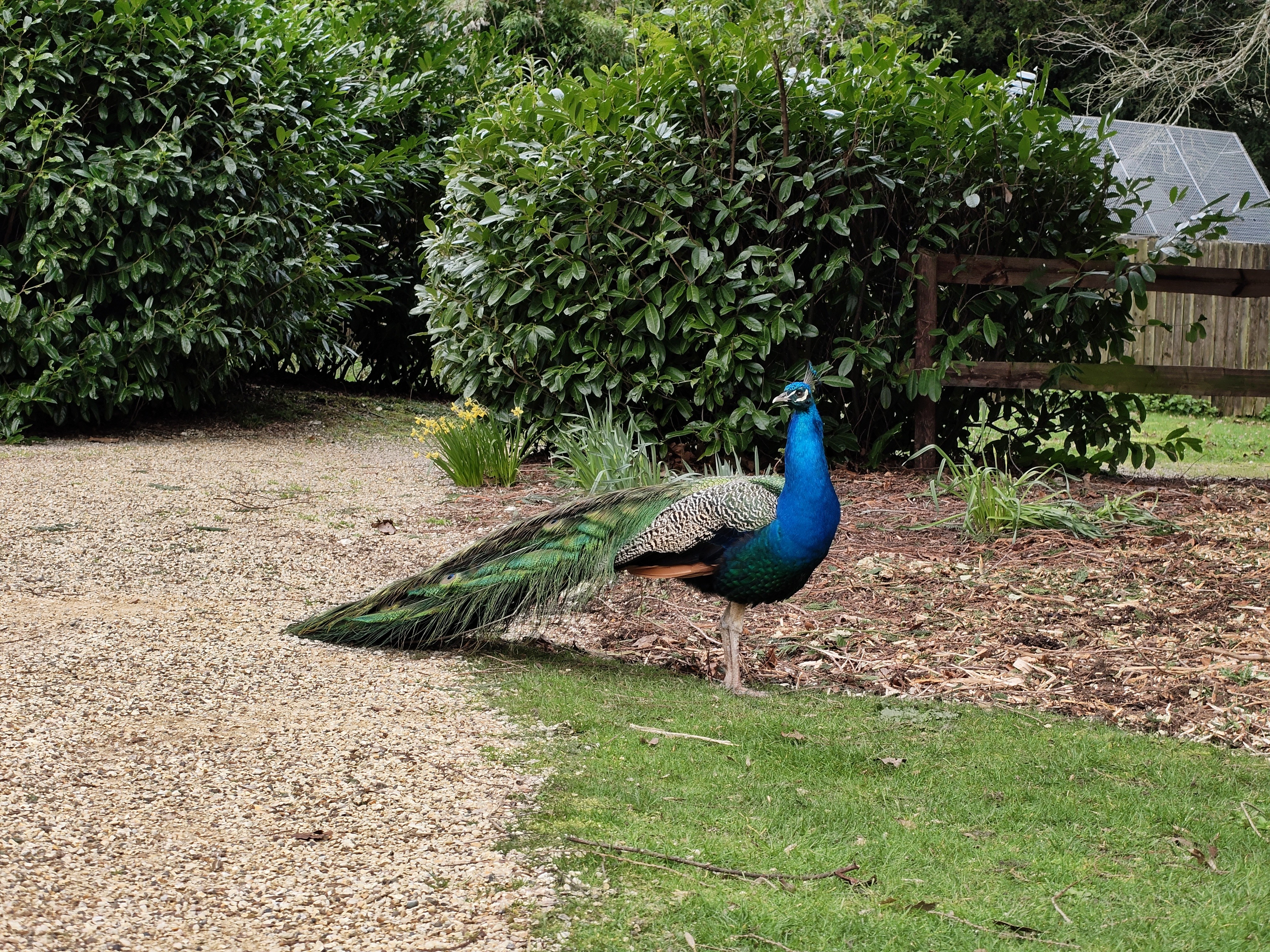
The caveat with the comparison to Phone (2) is that Phone (4a) has a telephoto lens, which is a very welcome addition. It has a 3.5x optical zoom which is useful for portraits and isolating subjects, as well as for zooming in to get wildlife photos without getting too close to the creatures. The quality holds up okay at 7x zoom too, but the digital zoom beyond that causes the quality to degrade noticeably. The 70x maximum is definitely more of a marketing gimmick than a useful feature. Thankfully this phone isn’t powerful enough to support the generative AI ‘photos’ the 4a Pro makes up when you zoom to levels you really can’t expect to get decent results at, though I would appreciate a bit more oomph for better general processing. Low light photos and night mode photos are also fairly good out-of-the-box, but like with the regular conditions, the results are not revolutionary and could do with some touch ups in post.
In terms of video, the video caps at 4K@30fps — there’s no 4K@60fps option, which is a shame, and again I’d appreciate some more power here to enable 4K@60fps. Otherwise the results seem good overall, although I have struggled to get the video to focus on objects within about 30 cm away from the camera.
Software
The Phone (4a) ships on Nothing OS 4.1 and continues to be one of the best Android skins around. NOS runs smoothly, offering an aesthetic non-intrusive design along with key features like the homescreen widgets and Essential Space.
Essential Space is genuinely becoming useful; when it was first released, I could not find a use for it. Now though, it’s much more functional, the processing is fast and it’s an excellent way to manage tasks. Essential Key has been moved to the left side this generation, swapped with the volume keys, which is a very poor design choice in my opinion (see my thoughts on the button layout earlier). I’m not offended by the move of the Essential Key, more about the movement of the volume keys as a result.
The Essential Key can be used to capture a screenshot, record your screen, or create a voice note, and everything goes straight into Essential Space where it gets analysed and organised. The voice recognition side could use some work, but the screen capturing and to-do list management aspect is spot on. It’s one of those features that sounds gimmicky in a press release and was almost pointless during the original release, but now actually saves time. I’ve frequently captured emails and turned those into reminders with one click, I’ve added calendar events and I’ve recorded voice notes. I am in two minds though whether it’s worth the extra button, because when I don’t want to use Essential Space, I really dislike the extra button on the frame.
Onto pre-installed apps. This is a con, but after the fallout from the 3a Lite it’s much more manageable, being limited to two apps pre-installed and one app that installs automatically after boot which I believe is region-dependent. In the case of the UK, TikTok gets installed automatically and Instagram and Facebook come pre-installed. You can uninstall them, but the principle of it grates when Nothing’s whole pitch is a clean, bloatware-free experience. It’s far better than 3a Lite, and at least people know what they’re signing up for this time instead of bloat suddenly appearing out of the blue. So far at least. But if this becomes a trend, it undermines one of the key reasons people choose Nothing over Samsung or Xiaomi. Time will tell.
Generative ringtones
Onto my favourite feature. The generative ringtones. They’re a genuine highlight and an absolute game changer. Having the same style of notification tone but with different variations per app is amazing and long overdue. Previously only a select few notification tones were appealing enough and suitable for me to use, either because the others were a bit loud/grating/intrusive, or just plain weird, so many apps had repeating tones and it was very much a manual effort to assign them appropriately. So this is something else. I just wish it was easier to set them up when transferring settings to the 4a — I ended up having to reset all my app settings in the factory reset menu to get rid of inherited notification sounds from my 2a Pro, which was quite frustrating. It would be easier when setting the phone up from a clean slate instead of transferring data over though. In any case, this might be my single most favourite feature on the 4a, and I really hope it gets implemented on other devices soon.
Glyphs
Weirdly, this is my favourite iteration of the Glyph, but I’ve found it’s also the least useful.
The new Glyph Bar is cleaner and more refined than the glyphs on previous models, offering a huge array of sequence patterns. The light leakage improvement is significant compared to older models, something I can’t unsee now when looking back at the glyphs of the previous phones. I enjoy that there are two brightness levels that get used for patterns, or when using the volume indicator for example, but wish I could make it dimmer as the bar is incredibly bright. The main problem is recognition. With the old glyph strips, you could catch a notification pattern from the side of your eye without staring directly at the phone — different contacts had visibly different patterns based on segments separated spatially that you’d learn to recognise. With the Glyph Bar, that peripheral recognition is much harder. The patterns exist, but they’re all happening in a small linear space rather than across the full back of the phone. If I’m using flip-to-glyph now, I can see the strip light up but I can’t tell what the notification was. Though that’s where Essential Notifications come in handy as the bar stays lit when I get a notification from a priority app. But trending away from easy peripheral recognition, only being able to distinguish between patterns when actually looking at the phone, is contradictory to the whole point of having the glyphs on the back as they’re meant to make it so that you look at your phone less without missing anything.
On to the latest feature for the glyphs — Live Notifications on the Glyph Bar — showing real-time delivery tracking from Uber, Zomato, Just Eat, and navigation from Google Maps. I can see it being useful for fast food deliveries I guess, but I don’t often get fast food so I have no idea how much I would use it. And when I’m using Maps to navigate, I’m looking at the screen so what’s the point in an A to B progress bar… but at least it’s cool. More of a feature Google have implemented in Android 16 really, and Nothing have just taken up the opportunity to integrate it into the glyphs to try and add use cases for the glyphs without relying on third parties or the community setting things up specifically for compatible Nothing phones.
Pros & Cons
Pros
Design and build quality — still looks like nothing else on the market
Good screen brightness and resolution (4,500 nits peak, 1.5K)
Battery life — comfortably a full day
Nothing OS — clean, fast, thoughtful, no bloatware (pre-installed apps aside)
Generative ringtones and notification customisation
Periscope telephoto at this price point
Glyph Bar — clean, no leakage and cool looking
UFS 3.1 storage speed upgrade — one of the most tangible daily improvements
Value pick overall
Cons
Size — Nothing Phones keep getting bigger, and this is the largest Nothing phone so far
Camera processing inconsistency — hardware promises more than software delivers
Pre-installed apps
Glyph Bar is harder to read at a glance than previous Glyph designs
Plastic frame — functional but feels cheap compared to the glass panels
No 4K@60fps video
IP64 lags behind competitors offering IP68 at similar prices
Only 3 years of OS updates — behind Samsung and Google
Button placement — volume keys and power button too close, too similar
Market Comparisons & Competition
vs Nothing Phone (4a) Pro
Looking at a spec sheet, a competitor for the base 4a is its bigger sibling. For roughly £150 more (£499 vs £349), the Pro gives you an aluminium unibody frame, a faster Snapdragon 7 Gen 4 chip, faster LPDDR5X RAM, a bigger, brighter and faster screen (despite having a smaller body), slimmer bezels, and a better main camera sensor.
That said, in my mind they cater to different people. Even though there are different configurations (8 GB/128 GB, 8 GB/256 GB, and 12 GB/256 GB), I only see the 8 GB versions of the base 4a as the viable options; if you want the extra RAM from the 12 GB version, you’ll likely be wanting for a bit more power than just the base phone will provide, and the Pro will probably give you more of what you want (design aside). Not having tried the Pro myself, just seeing the feedback on it from Pro users it seems like the Pro really does trump the base 4a in all areas. But if you don’t need the better specs, the better processing, the better screen and the better camera and you want to keep the budget lower, the base 4a is the way to go.
vs Google Pixel 10a
This is the most direct competitor. The Pixel 10a costs more (£490 vs £349 starting) so might be more of a direct competitor for the Pro version, but the most obvious difference is that the 10a brings Google’s better camera processing. The 4a counters with a better display (brighter, higher resolution), a periscope telephoto the Pixel lacks entirely, and a significantly lower price. The 4a also has a better OS and a better design overall, although that’s a subjective opinion.
vs Nothing Phone (3a)
In my opinion, this is the most valuable comparison. What has changed since the previous generation, and, more importantly, why?
There are two aspects here. Upgrades that are due to tech moving forward and market availability, and upgrades that are due to Nothing maturing and making different decisions. And looking at the specs sheet, the only thing that stands out as being because tech moves forward is the newer chip in the 4a compared to the 3a (SD 7s Gen 4 vs Gen 3). And even then, the Gen 4 came out in August 2025, so it’s not a brand new chip, it’s just had the chance to be tested more.
The telephoto camera, the UFS 3.1 storage, the display? All things they could theoretically have put in the 3a, though admittedly prices may have dropped since last year. And of course NOS 4.1 is new, along with more refined camera processing, both of which come from Nothing’s experience. So while yes the 4a is an improvement over the 3a in practically all areas on paper, not much of that actually comes from new tech, instead coming from cost-effectiveness and design choices. That, to me, is the real story of the 4a — it’s less about technological progress and more about Nothing growing up as a company and being able to afford better components.
Verdict
The Nothing Phone (4a) is a good phone. It’s a safe, cost-effective, iterative upgrade that improves on the 3a in all the ways you’d expect — better display, better zoom, faster storage, bigger battery — without taking any real risks. And maybe that’s fine. The Pro tries to push the boat out a bit more, and seems to have succeeded, but having a safe market option in the back pocket reduces the risk of this launch massively in case the Pro version flopped.
Do I think we needed the base 4a yet? Probably not. I’d happily see the 4a skipped this year like Nothing are doing with the Phone 4, and see some more major upgrades next year to limit incremental improvements a yearly release brings. If we hadn’t had the 3a last year and I was comparing this to the 2a from two years ago, the differences are much more obvious and I would be able to big up the improvements more. But that also means Nothing would be forfeiting a large amount of turnover in the interim year without a phone release, and they need to keep the momentum going and build up their reputation and experience so they can procure the right components for their customers at a cost effective price. And that might be the most major improvement here — Nothing’s experience. They can now afford to implement better screens and equip better cameras. A lot of the 4a is about things I would have loved to see in Nothing phones from the beginning, but they couldn’t do that yet because they were too young. But with maturity, maybe we’re getting to the point where we genuinely don’t need a phone every year because the updates are too minimal. Maybe we would go to a cycle where the 4a releases in 2026, 4 in 2027, then 5a isn’t until 2028. Controversial opinion, but I believe (business decisions aside) that we would see more worthwhile upgrades from a longer cycle, giving Nothing an extra year of cooking time and fewer devices to focus their limited resources on; we would still get a device a year, and any incremental updates would feel more real.
For now, though, the 4a does what it set out to do: keep Nothing’s existing audience happy without alienating them. It’s a phone for people who already know they like Nothing phones. It’s a phone for people who have been waiting for an affordable periscope camera. It’s a phone for people who want a phone that can do the essentials, and do them well, without going overkill. Whether it converts anyone new is a different question — and that might be the Pro’s job.
Score: 7.5/10
