
Hey Community,
Nothing OS 5.0 Open Beta is out now on Phone (3) and Phone (4a) Pro.
Head to nothing.tech to download the latest Nothing Beta Hub APK and join the Open Beta.
Please note: the Phone (4a) Pro Open Beta is not available in Japan at this time due to pending local certification. Users in Japan will not see the Open Beta build when checking for updates.
If you want to explore everything new in Nothing OS 5.0 first, check out our Nothing OS 5.0 new features explained post.
Get the Open Beta
We’ve created a dedicated Nothing OS 5.0 Open Beta page on nothing.tech with everything you need to get started.
At the bottom of the page you can download the latest Nothing Beta Hub v2.0 APK. above that you’ll find the rollout timeline, feature availability, supported builds, installation steps, feedback instructions and rollback guidance.
Since this is beta software, it may interfere with your data and require a factory reset. In this instance, your data will be lost. We strongly recommend backing up all your data before accessing and using the software.
👉 Download Nothing OS 5.0 Open Beta
A few things to know
- You may see media and select community reviewers sharing the refreshed home screen from a separate early preview build. This feature is still in development and is not included in the Nothing OS 5.0 Open Beta yet.
- The refreshed home screen and Micrographics clock face are planned to arrive with the general release, starting in October.
- Essential Apps Builder is in early beta, with access rolling out gradually. If you don’t have access yet, you can join the waitlist. We’re looking to rapidly expand access and bring more people in to try building Essential Apps directly on their phone.
- Essential Space updates are rolling out separately through Google Play, with MCP support arriving in October and the redesigned capture experience arriving in November. All other confirmed Nothing OS 5.0 features are available in the Open Beta.
- Real-time translation in Essential Voice is also coming later this year.
- Once you join through Beta Hub, the Open Beta update can take up to 5 minutes to appear. If you see a stable update first, install it and check again. The Open Beta will follow.
- The access channel stays open for 7 days. After that, it closes to new participants.
🗣️ Share your feedback
Once you’ve installed it, share your feedback through Settings > System > Feedback, or join the dedicated Nothing OS 5.0 Open Beta discussions here on Community.
We’re looking forward to hearing what you think.
Rollout timeline
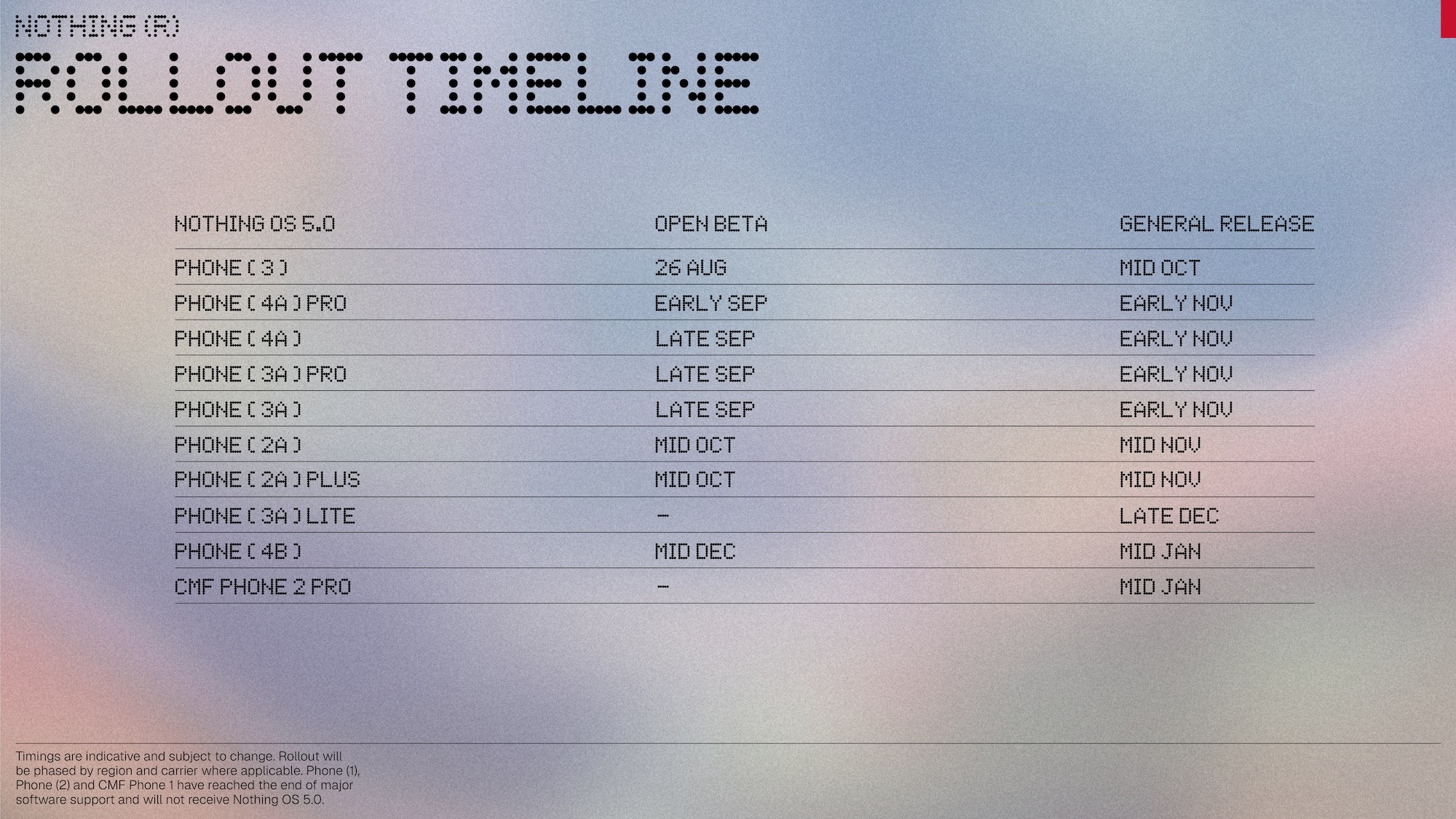
📆 Timings are indicative and may change as we test each build and prepare it for individual devices, regions and carriers.
🔗 Click here to learn more about the rollout, and follow for all future updates and changes.


