Hi everyone,
Today, we rolled out the Nothing OS 4.0 Open Beta for the Phone (3a) Series, which included Lock Glimpse and sparked a lot of questions. We had planned to cover this next week as part of a new product announcement, but we wanted to address it now to be transparent and provide you with the full context.
Building Nothing from the ground up hasn’t been easy. We are the only smartphone brand in the last decade that has successfully launched, scaled and developed full end-to-end capabilities. This is no small feat in a market defined by high entry barriers, from massive capital requirements and complex supply chains to intense competition.
One of the biggest challenges for any new entrant is managing the BOM (Bill of Materials) cost, which is higher than that of established players. On top of this, most brands also have software-based revenue streams, the most straightforward being pre-installed partner apps and services. This is a common approach across the industry, including for established brands like Samsung.
For us, this means operating on razor-thin margins and making careful, deliberate choices for every aspect of the product while still delivering an optimal user experience. As we continue investing in hardware and software innovation as well as sustaining our growth, we need to explore sustainable revenue models to avoid passing costs and ensuring optimal pricings for our products - especially for entry- and mid-segment products.
Moving forward, on select non-flagship devices, we’ll start including a carefully considered selection of third-party partner apps and services that don’t disrupt the Nothing OS experience you love. These are apps most people install on day one, like Instagram. They’re not random - we’re working with popular platforms many of you already use daily, and in some cases, these integrations can even enhance performance or provide tighter experiences, such as improved camera or sharing features.
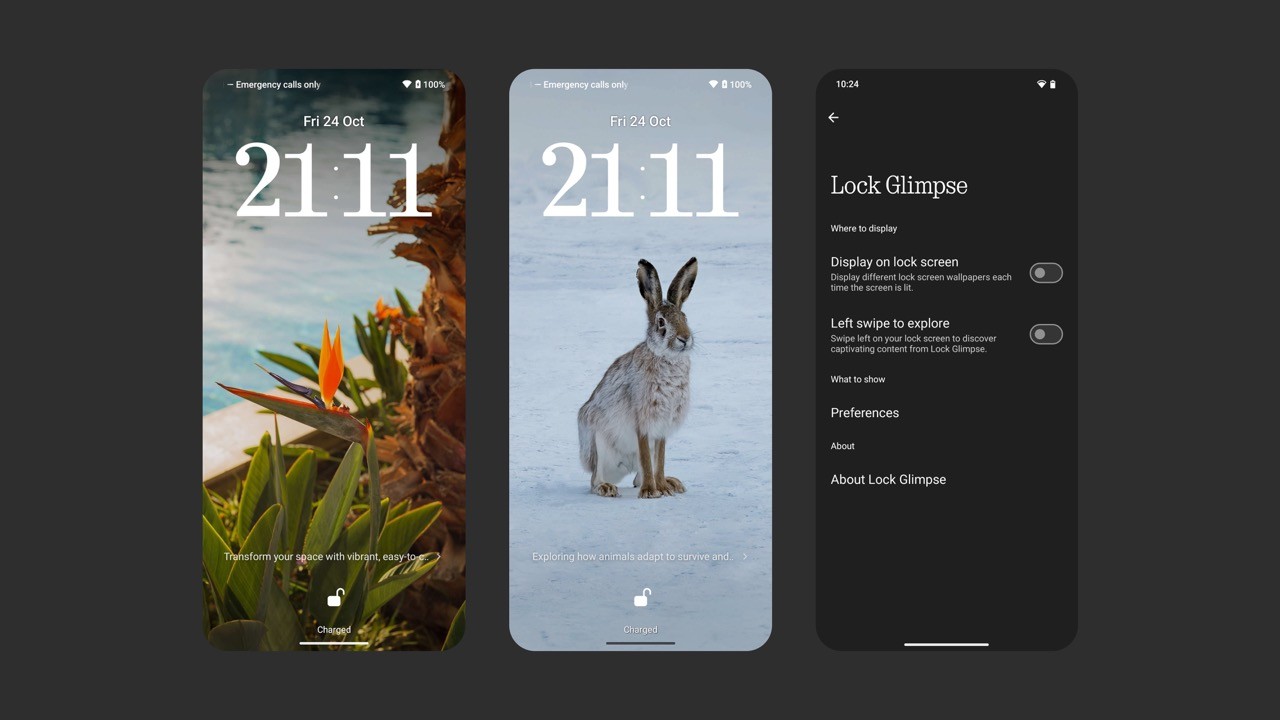
As part of this we have a new feature called Lock Glimpse being tested in the Nothing OS 4.0 Open Beta on the Phone (3a) Series.
Lock Glimpse brings fresh, high-quality wallpapers to your lock screen, curated to your taste across nine categories. It can also surface timely updates and useful content, designed to enhance your experience, not distract you.
A few important details:
On Phone (3a) Series, Lock Glimpse is off by default.
You can enable it anytime in Settings, or access it only by swiping left from your lock screen.
You can customize wallpaper categories, refresh anytime, or disable it completely.
In future updates, you’ll be able to use your own photos, replacing standard wallpapers entirely and making every unlock uniquely yours.
If you choose to turn it on, no personal data is shared.
This is standard across the industry, but we’ll always do it the Nothing way - redesigning each element and integrating them into Nothing OS in the most optimal way (default designs look terrible…) - while keeping everything completely under your control, giving you the ability to remove things or turn features on and off as you wish.
What’s not changing: our focus remains on delivering the best possible user experience while taking the steps needed to achieve our ambitions. We’ll always:
Keep partner apps minimal and easy to remove
Be upfront about what’s pre-installed and why
Give you full control over features like Lock Glimpse
We’d rather be open and transparent about this change and hear your feedback and suggestions. We’ll keep you posted on any new developments regarding third-party apps and services.
Thanks
Akis
[ UPDATE ] - 30 OCT
Yesterday, we launched Phone (3a) Lite, the first entry-level smartphone from Nothing. As mentioned above, we want to remain open and transparent about the inclusion of third-party apps and services in Nothing OS, and we welcome your feedback and suggestions regarding this change.
Continuing on that, we’ve made some new developments regarding third-party apps and services and have begun including a carefully selected range of third-party partner apps and app recommendation services in Phone (3a) Lite.
These are some of the most widely used apps globally , the ones most users tend to install on day one.
TikTok - EU , UK and Japan
Instagram - All Regions ( except Japan )
Facebook - All Regions ( except Japan )
Because these apps come pre-installed, they offer :
Faster startup: These apps launch 50 to 100 milliseconds quicker.
Smarter background performance: App background retention is optimized, so when you switch back to Instagram, Facebook, or TikTok, they resume exactly where you left off without reloading.
Better power efficiency: These apps are optimized for power efficiency, helping extend your device’s battery life by reducing power consumption.
Seamless camera access: Using the camera within these apps is smoother, providing a more fluid shooting experience and reducing the chance of lag or crashes.
And importantly, you still retain full control. If you choose to, all three apps can be uninstalled at any time.
Additionally, some community members have raised concerns about the Meta App Installer, Meta App Manager, and Meta Service. These apps are designed to ensure that pre-installed apps are updated to their latest versions in a timely manner and to maintain their stability.
If users wish to disable them, they can do so by navigating to: Settings App > All apps > Tap the icon in the top-right corner > Select “Show system” > Find the Meta apps > Select the “disable” button.
However, we recommend not disabling these apps if you intend to use the pre-installed apps, as they are essential for ensuring the stability and proper functioning of those apps.
We are also introducing recommendation services which essentially recommend apps that are curated to enhance the initial setup experience for users by helping them quickly discover essential utility and social apps, rather than searching for and downloading each one individually from the Play Store.
A few important details:
It’s only visible during the initial phone setup or when the phone is reactivated after a factory reset. Once the setup is complete, there are no more app suggestions during daily use.
Users have full control over it — you can choose to skip and not download any of the recommended apps.
The recommended apps are verified by a trusted partner, eliminating the risk of malware or low-quality software.
If users wish to disable this feature , they can do so by navigating to: Settings App > All apps > Tap the icon in the top-right corner > Select “Show system” > Find “App services” > Select the “disable” button.
[ UPDATE ] 3 NOV
Hi everyone,
Following your feedback and suggestions, we’ve been working on making pre-installed services more flexible and within your control. Starting later this month, you’ll be able to completely remove Meta App Installer, Meta App Manager, and Meta Services from your device background.
Previously, these could only be disabled. While we recommended keeping them active for better stability of pre-installed apps like Instagram or Facebook, we understand that some users prefer full control over what stays on their device.
We’re aiming to roll this out by the end of the month and will confirm once it’s live. Thank you for your continued feedback. It helps us keep improving while staying true to our promise of openness and user choice.
[ UPDATE ] 9 JAN
Hi everyone,
With the latest software updates, we’ve introduced improvements that give you more control over pre-installed services, Lock Glimpse, and app recommendations. Sharing the details below for full transparency.
Meta Services
You can now fully remove Meta App Installer, Meta App Manager, and Meta Service from the background.
Here is how it works:
The Disable button remains visible in the app details page.
When you tap Disable, you will see a prompt asking you to restart your device.
After the reboot, all Meta services are removed from the background.
Disabling any one of them will automatically remove the others.
After a factory reset, these services will reappear as part of the original system image and can be removed again using the same steps.
App Recommendations
With the latest update on Nothing (a) series and CMF phones, you may see a small pop-up suggesting recommended apps. This is part of the setup experience and appears during initial device setup or after certain software updates, when setup-related flows are triggered again. If you’re not interested, you can simply swipe left to dismiss it.
If you prefer not to use this feature at all, you can turn it off at any time by going to Settings > Apps > All apps > Top-right icon > Show system > App Services > Disable.
We’re also working on adding support to completely uninstall App Services in a future OTA, following the same approach as Meta Services.
Lock Glimpse
Based on feedback and after careful consideration, we’ve decided to remove Lock Glimpse from the Nothing Phone (a) Series except Lite. We’ll only reconsider it once it’s meaningfully improved to feel less intrusive and more considered.
We’ll continue to be open about these decisions. Your feedback directly shapes how Nothing OS evolves.
Akis


